APIT-06Order confirmation email
One agent. A whole team.
Stop juggling agents and tools: talk to one agent, and it puts a team of specialists to work. Claude, Codex and Grok in one desktop app, for macOS, Linux and Windows. With Jauvex Pro, your whole company runs on it.
Launch
5 tasks · 3 done · boards/launch.md · boards/launch-DONE.md
To do
1Doing
1FrontendT-05Feature comparison on mobile
Done
3T-03Plan picker trained2026-09-30
T-02/plans endpoint2026-09-30
T-01Plans table on mobile2026-09-30
Tell Claude what to change on this board, by text or by voice: it adds, takes, moves and finishes items in the board's files, and the board redraws from them. It sees the board on every message.
What's left before launch?
2 open: the feature comparison on mobile (doing) and the order confirmation email (to do). I've asked Frontend to finish the feature comparison first.
Hearing you
Claude
Weekly roast drop
This week's roast on the storefront: the banner and its copy, your approval, then the plans.
Run #4 · step 2 of 3 · started 09:00
- Whenevery Monday 09:00 · next Mon 09:00
- 1Banner and copyFrontenddone · 4 m
- 2Approve the dropyouwaiting for you
- 3New roast in the plansAPI
- Donethe drop live on the storefront, in every plan
Runs · 4 · average 41 m over 3 finished
#4 running 2026-09-30 09:00 · by its schedule, every Monday 09:00
#3 done · 40 m 2026-09-23 09:00 · by its schedule, every Monday 09:00
#2 done · 31 m 2026-09-16 09:00 · by its schedule, every Monday 09:00
Defined in workflows/weekly-roast-drop.md, plain markdown, yours to edit: the flow follows.
Tell Claude what this workflow should do, by text or by voice: it writes and changes the steps in the file, runs the workflow, and explains a run. It sees the workflow and its runs on every message.
Claude
Files, pages and images open beside the chat.
The app's look, animated. The folder, the conversations, the board, the workflow and the page are demo content.
curl -fsSL https://jauvex.ai/install | shFor macOS. Paste it into Terminal: it builds Jauvex Personal on your Mac, and offers to set up Node if it is missing. Jauvex Pro is by invitation.
curl -fsSL https://jauvex.ai/install | shFor Ubuntu 24.04 or newer. Paste it into a terminal: it builds Jauvex Personal on your computer and adds it to your apps. Jauvex Pro is by invitation.
irm https://jauvex.ai/install/windows | iexFor Windows 10 and 11, 64-bit. Paste it into PowerShell: it builds Jauvex Personal on your computer and adds it to the Start menu. Jauvex Pro is by invitation.
Works with
Claude Code
Codex
Grok
TypeSafe Jev
More providers coming soon
OpenRouterDeepSeekGeminiGitHub CopilotCursorOpenCodeAmpClineGooseKiroQwen CodeKimiMistral Vibe
Planned, not in Jauvex yet.
How it works.
Talk to one agent.
Say what you need, out loud or by typing.
It builds the team.
Specialists where the work is, on Claude, Codex or Grok.
They do the work.
In your folders, on your boards, every step on record.
You decide.
Anything that goes out waits for your yes.
Jauvex Pro · by invitation
Jauvex Pro. Run your company from one conversation.
Personal gives you a team of agents. Pro gives your company one.Each company gets its own workspace, with its departments as folders. Its workspace agent knows your boards and workflows, sets up the agents each department needs, and hands them the work. Your people join from their own app or their phone, and everyone sees what's waiting on them.
The film plays from YouTube when you press play.
A workspace for each company
Departments as folders, each with its agents, boards and workflows.
An agent that runs the team
It creates agents where they're needed, hands out the work, and tells you what moved.
One dashboard for the company
What's waiting on you, today's runs, who's working, and each person's own list.
Huddles
Meet with your people and your agents on a call. It's transcribed live, and the summary and action items are saved.
Your whole team, in one place
People join the workspace from their own app, and every message shows who wrote it.
On your phone
Follow every agent, answer what they ask, send work or stop it. Nothing to install.
On your own server
Run it on a server your team reaches from anywhere, or on Mac and Windows.
No agents talking in circles
Two agents stop after the number of messages you set, until you step in.
Personal or Pro.
| Personal | Pro By invitation | |
|---|---|---|
| For | You and your projects | Your company and your team |
| Claude, Codex and Grok agents, side by side | Yes | Yes |
| Talk or type | Yes | Yes |
| One agent that sets up your agents | The Jauvex agent | A workspace agent for each company |
| Boards and workflows, with your approval | Yes | Yes |
| What needs you, on a dashboard | Yes | Per workspace, for each person |
| Workspaces for companies and teams | No | Yes |
| Your people in the same workspace | No | Yes |
| Huddles with people and agents | No | Yes |
| Your agents on your phone | No | Yes |
| Runs on your own server | No | Yes |
| Limit on agents talking to each other | Built in | You set it |
| Install | Contact us |
Jauvex Pro is by invitation.
Tell us about your company, and we'll show you how it would run.
Contact us for Jauvex Pro accessFor companies
We install it in your company.
Reindent is one person and a workforce of agents. We run our own company on Jauvex Pro every day. Now we set the same thing up inside yours.
- We map your workThe tasks that eat your week.
- We build your teamAgents in each department, and workflows that wait for your yes.
- We train your peopleSo they run it themselves.
It never talks over you.
- Start speaking and its voice stops at once.
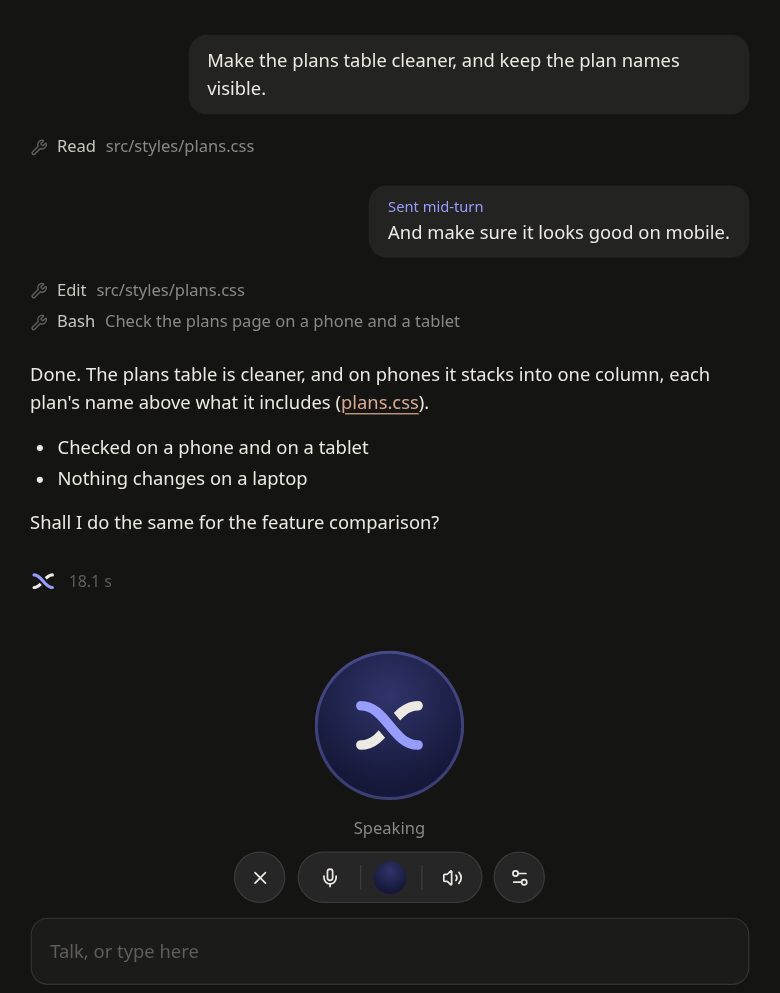
- Your voice never stops the work: what you say while an agent works joins its running turn. It stops only when you clearly ask it to.
- It can mute itself after each message. Say “Hey Jauvex” to bring it back; while muted, nothing else it hears is sent or written down.
It answers in three beats
- A quick word
- What it understood
- A summary of the agent's answer
- It names and starts agents by voice, and lets agents talk to each other inside the app.
- What you say is transcribed on your computer.

It builds the team.
Specialists, side by side
Each agent has its own job and its own chat, on Claude, Codex or Grok, all in one window.
Agents message each other
Inside the app, across providers: one asks another, and the answer comes back by itself.
A workspace for each company Pro
One per company or person, each with its folders, and a workspace agent that reads its boards and workflows, creates agents in its folders and hands them work.
It works in your tools.
Boards
To-do lists that live in your folders, as columns or a Kanban board. Agents add, take, move and finish items, and you can talk to a board.
Workflows
Repeat work as steps, each done by an agent, on a schedule or when you start it. Every run is on record.
The right pane
Files, pages and images open beside the chat.
The server's screen Pro
On a workspace hosted on a server, its screen opens above the chat: watch your agents' browser, and take over when it needs a login.
Nothing goes out without you.
What needs you comes first
A dashboard lists what waits on you: a step to approve, an agent asking permission, new replies, and today's runs. In Pro, every workspace has one, with each person's own list.
Workflows stop where you say
A step that waits for you shows what the step before found and the files it wrote, with its options as buttons. You press continue.
Agents ask first
Ask permission is where every agent starts: allow a tool once, always, or deny it. Auto and full access are your choice, per provider.
Agents don't talk in circles Pro
Two agents exchange at most the number of messages you set (3, 5, 10 or unlimited), then wait until you write again.
Under the hood.
Talk to any agent
What you say is transcribed on your computer, and each answer comes back as a short spoken summary.
Steer, don't interrupt
Speaking while an agent works adds to its work without interrupting it.
Folders as projects
Like in Claude Code. Pick up any Claude, Codex or Grok session of a folder, or start new ones.
One provider per session
For life. Each row carries its provider's mark.
Claude CodeCodexGrok
Context and usage
A context meter and a usage panel for each provider.
English and Spanish
The app follows your system's language, or the one you pick. Your agents answer in the language you write to them in.
Your look
Light, dark, or colours you describe to the Jauvex agent: it offers three palettes and puts on the one you pick.
What's new
Every update says what it brings, before you update and after.
Jev agents
TypeSafe Jev, for the fast decisions. Optional, with a TypeSafe key. A Claude, Codex or Grok Trainer sets one up and runs it.
Ideas and bugs
Tell the Jauvex agent, and it writes the report to us, for you to check before it goes.
Your sessions stay yours.
They stay on your computer, where Claude Code, Codex and Grok keep them, or on your own server with Pro.
One command.
curl -fsSL https://jauvex.ai/install | sh- For macOS. Paste it into Terminal. It needs Node 22.18 or newer, and offers to set it up if it is missing.
- It builds Jauvex on your Mac (nothing prebuilt is downloaded) and puts Jauvex.app in Applications.
- It offers to install Claude Code, Codex and Grok. Sign in to at least one, with its own command:
claude auth login,codex loginorgrok login. - The same command updates it, and from 1.1.0 the app offers each new version itself. What changed in each one is in the changelog.
curl -fsSL https://jauvex.ai/install | sh- For Ubuntu 24.04 or newer, on a desktop. Paste it into a terminal, as yourself (not with sudo).
- It installs the system packages it needs and Node 22 if missing, builds Jauvex from source in ~/.jauvex, and adds Jauvex to your apps and the command
jauvex. It asks for your password once, for those packages and the app's sandbox. - It offers to install Claude Code, Codex and Grok. Sign in to at least one, with its own command:
claude auth login,codex loginorgrok login. On Linux the voice speaks English. - To update, run the same command again with Jauvex closed. What changed in each version is in the changelog.
irm https://jauvex.ai/install/windows | iex- For Windows 10 and 11, 64-bit. Paste it into PowerShell, as yourself (not as administrator).
- It installs Node 22, Git and Microsoft's Visual C++ runtime with winget if they are missing (Windows asks for administrator rights for those only), builds Jauvex from source in your user folder, and adds Jauvex to the Start menu.
- It offers to install Claude Code, Codex and Grok. Sign in to at least one, with its own command:
claude auth login,codex loginorgrok login. On Windows the voice speaks English. - To update, run the same command again with Jauvex closed. What changed in each version is in the changelog.
Jauvex Pro is by invitation. The code is on GitHub.